
Theo: Theo opens by saying Fable 5 changed his pace of work dramatically. He contrasts the returned model with the period where he tried to make Opus and GPT-5.5 fill the gap, then frames the video around the practical change: the model is useful because it can carry work farther, not merely because it is smarter at isolated prompts.
Bottom Line
The setup is a routing layer. Global CLAUDE.md teaches model selection and Codex handoffs; small skills tell Claude when and how to call Codex for review, implementation, and computer-use verification; worktrees and artifact directories make parallelism auditable.
What changed in this pass
Added source corroboration, downloaded the public screenshot, copied frame evidence into the report, re-ran OCR over key frames, and split recovered content by confidence.
What is not recoverable
No full file is visible from byte one to EOF. This report reconstructs the visible structure and behavior rather than pretending the screenshots expose complete files.
What to copy from the idea
Copy the architecture: model routing, explicit skill triggers, artifact folders, worktree isolation, and screenshot validation. Do not blindly copy somebody else's exact local rules.
Evidence Gallery
Images are included so the extraction can be audited without re-scrubbing the video.
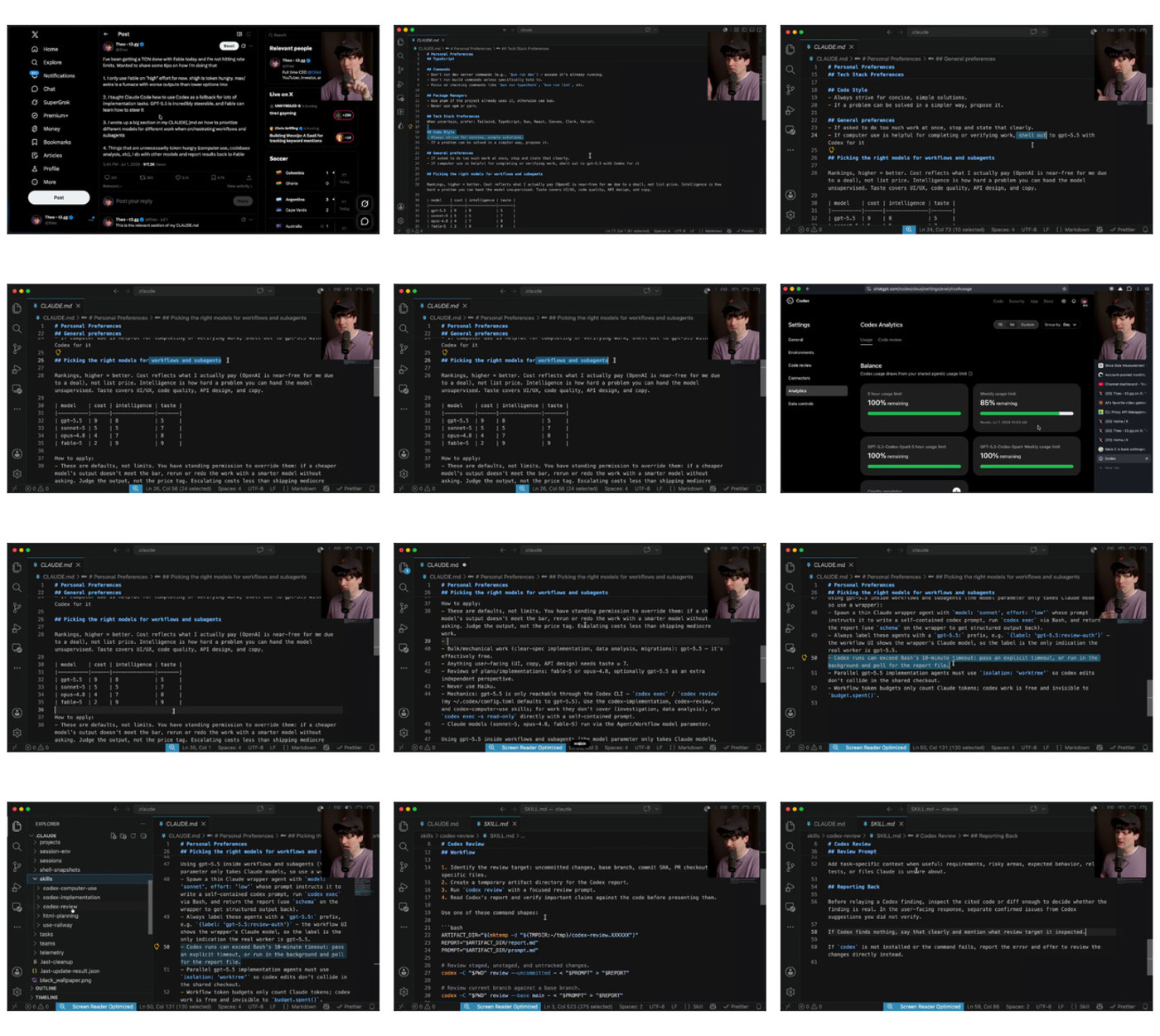
Visible File Inventory
| File | Confidence | Visibility | Recovered role |
|---|---|---|---|
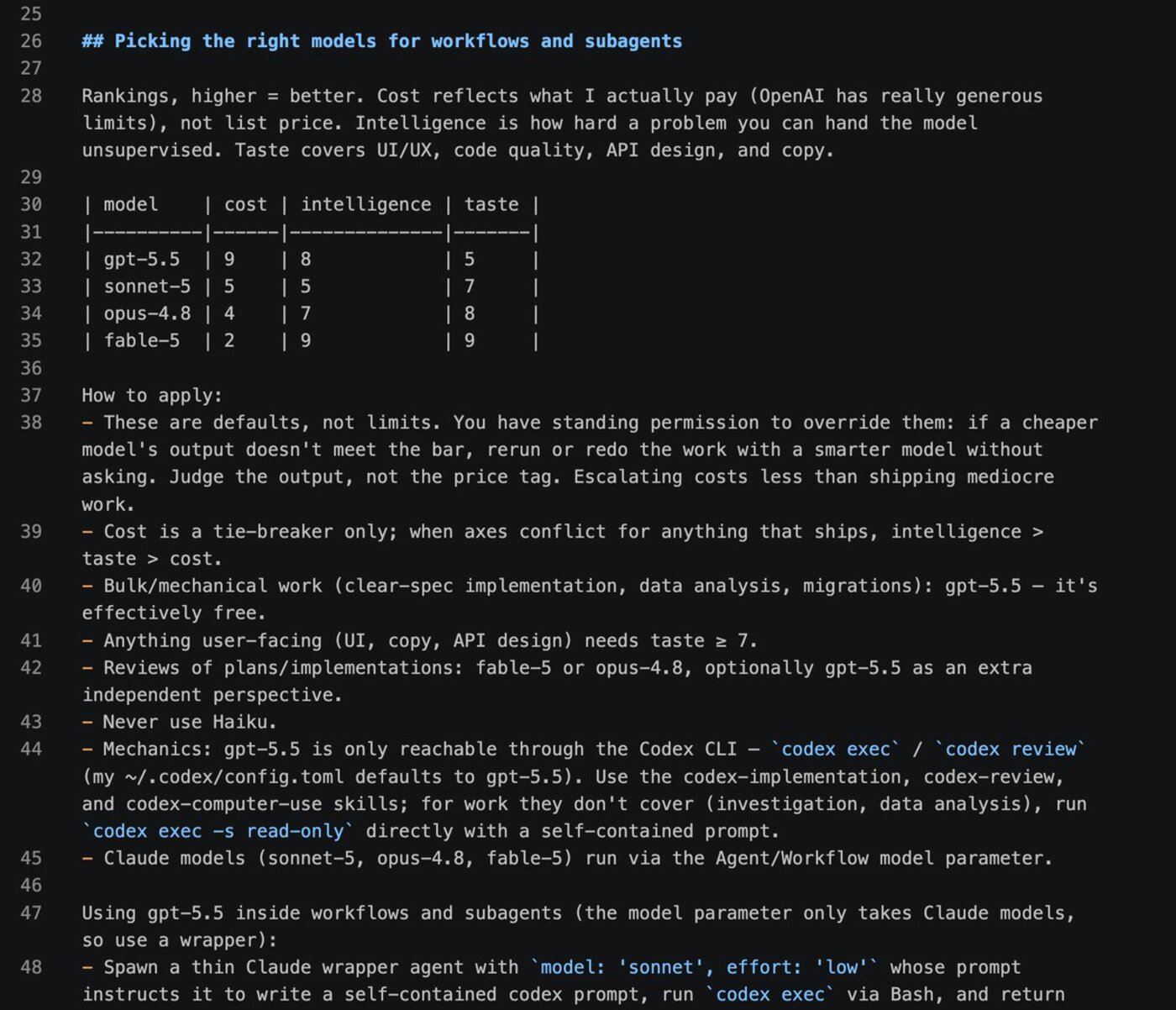
| ~/.claude/CLAUDE.md | High | Partial, but multiple frames plus public screenshot | Global preferences, model-routing table, routing mechanics, wrapper-agent rules, Codex timeout/worktree/budget notes. |
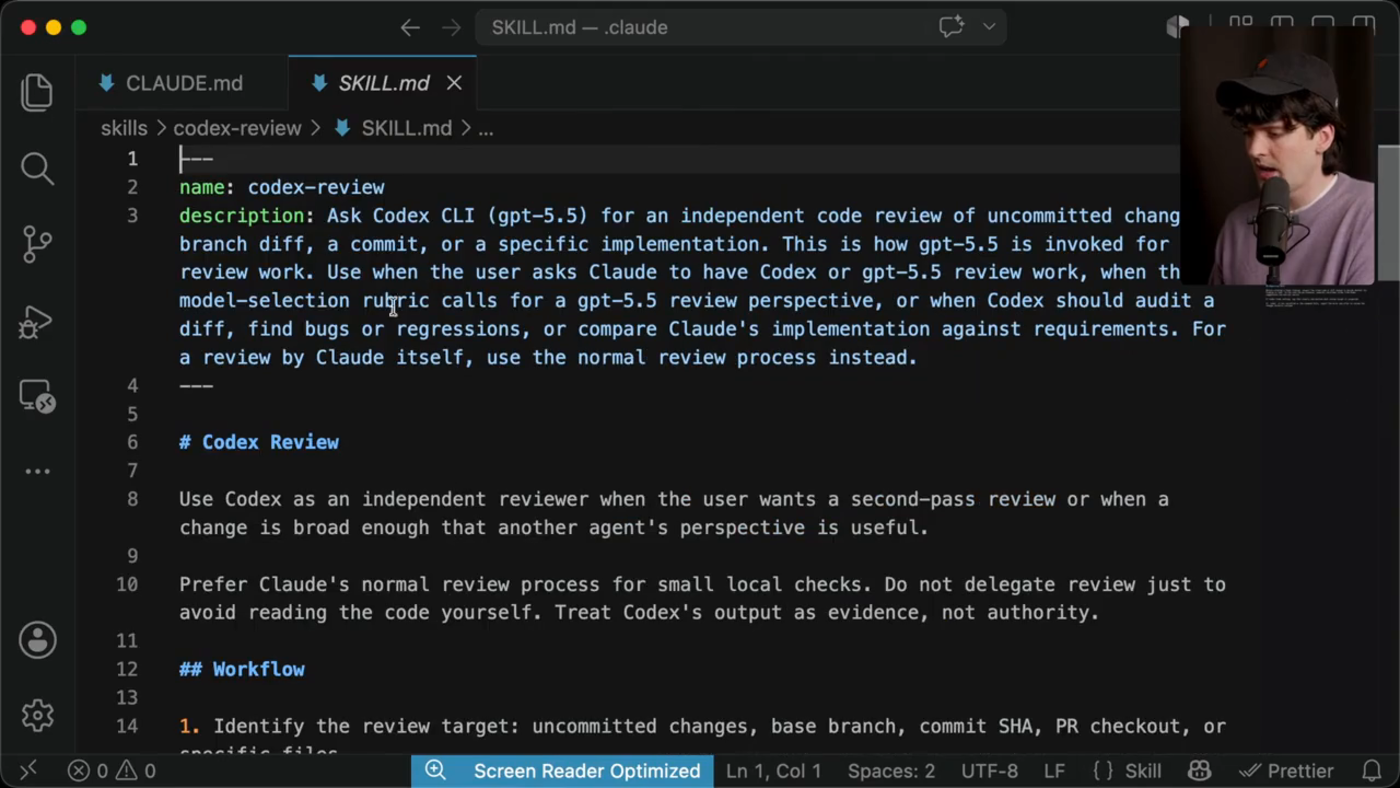
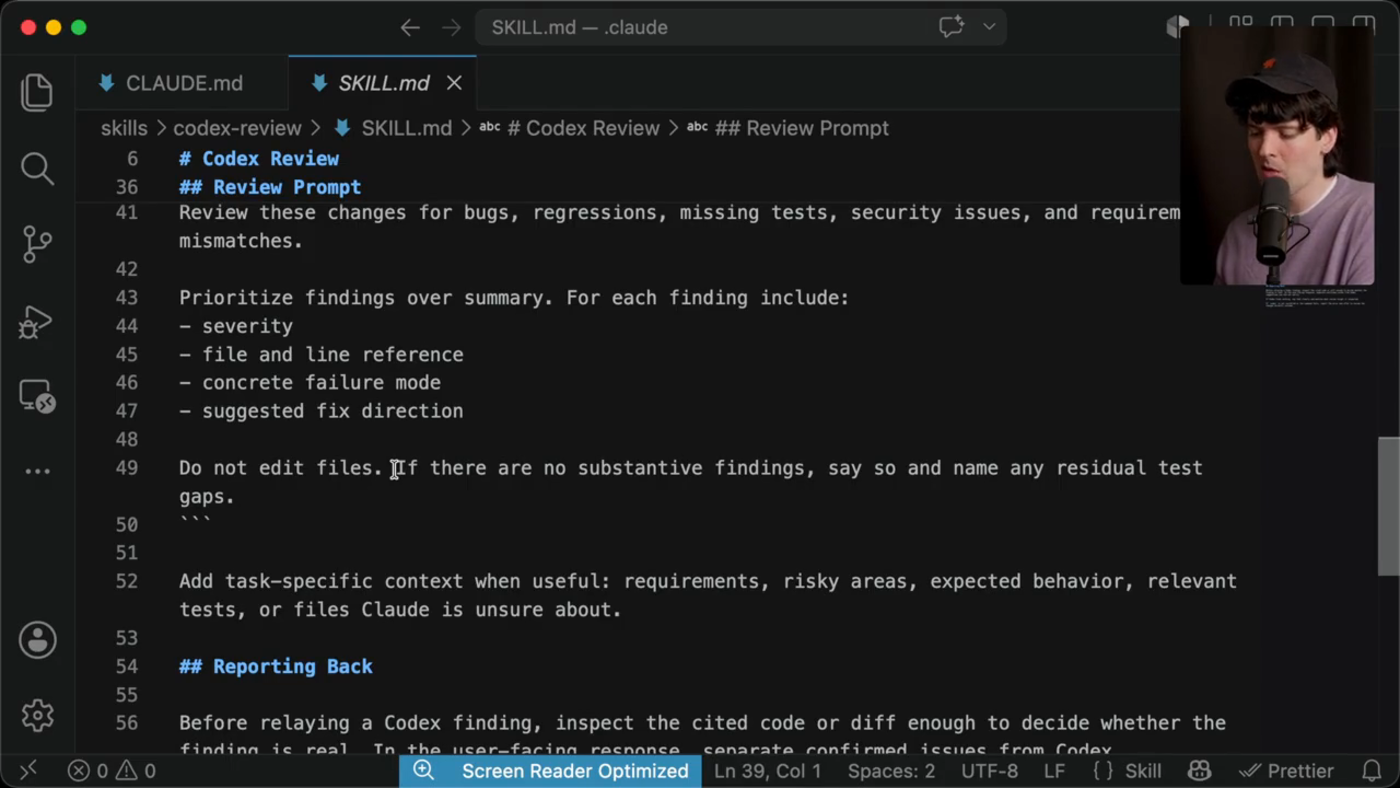
| ~/.claude/skills/codex-review/SKILL.md | High | Mostly visible across dense frames | Independent Codex/GPT-5.5 code review for diffs, commits, PR checkouts, and broad implementation audits. |
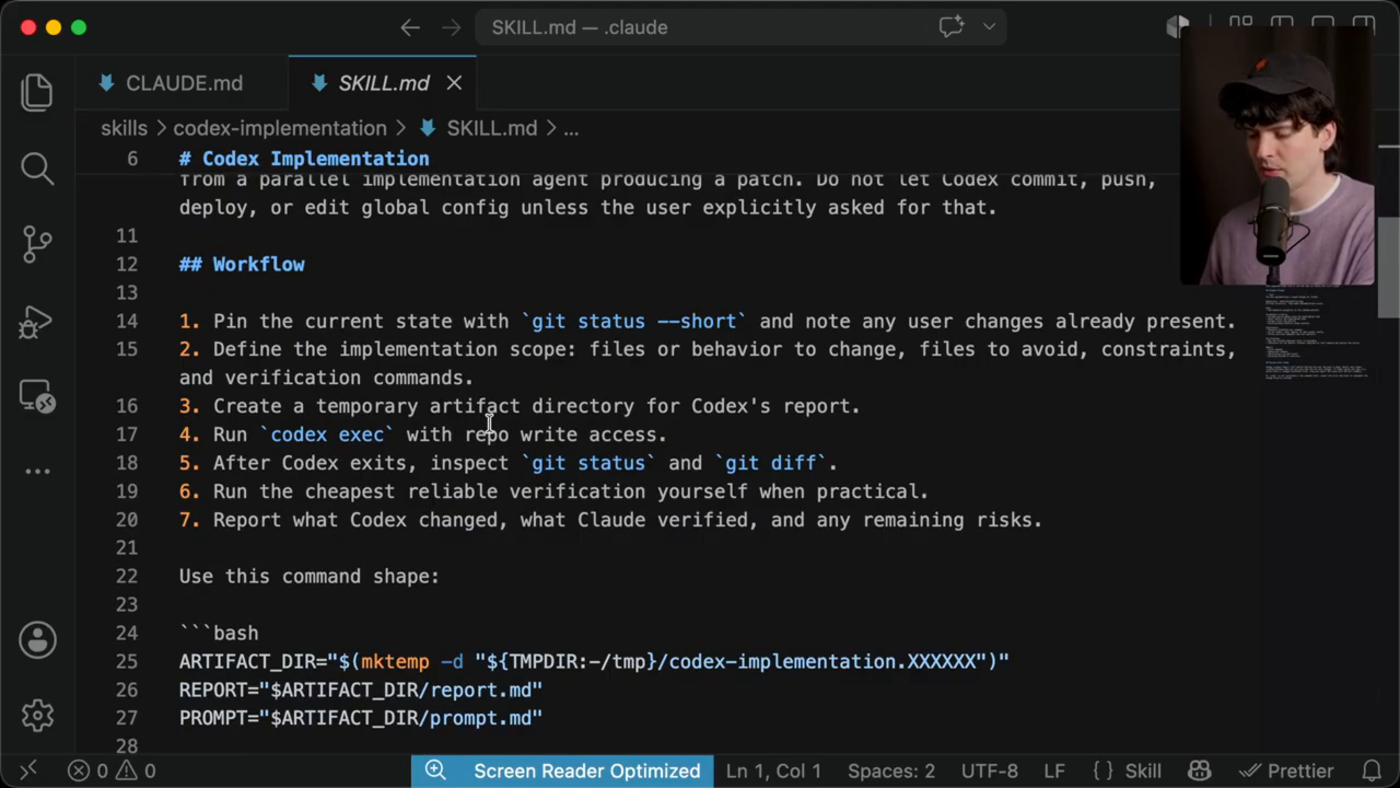
| ~/.claude/skills/codex-implementation/SKILL.md | Medium | Top and workflow visible, command details partly clipped | Bounded patch-producing agent: pin state, define scope, run codex exec, inspect diff, verify, report. |
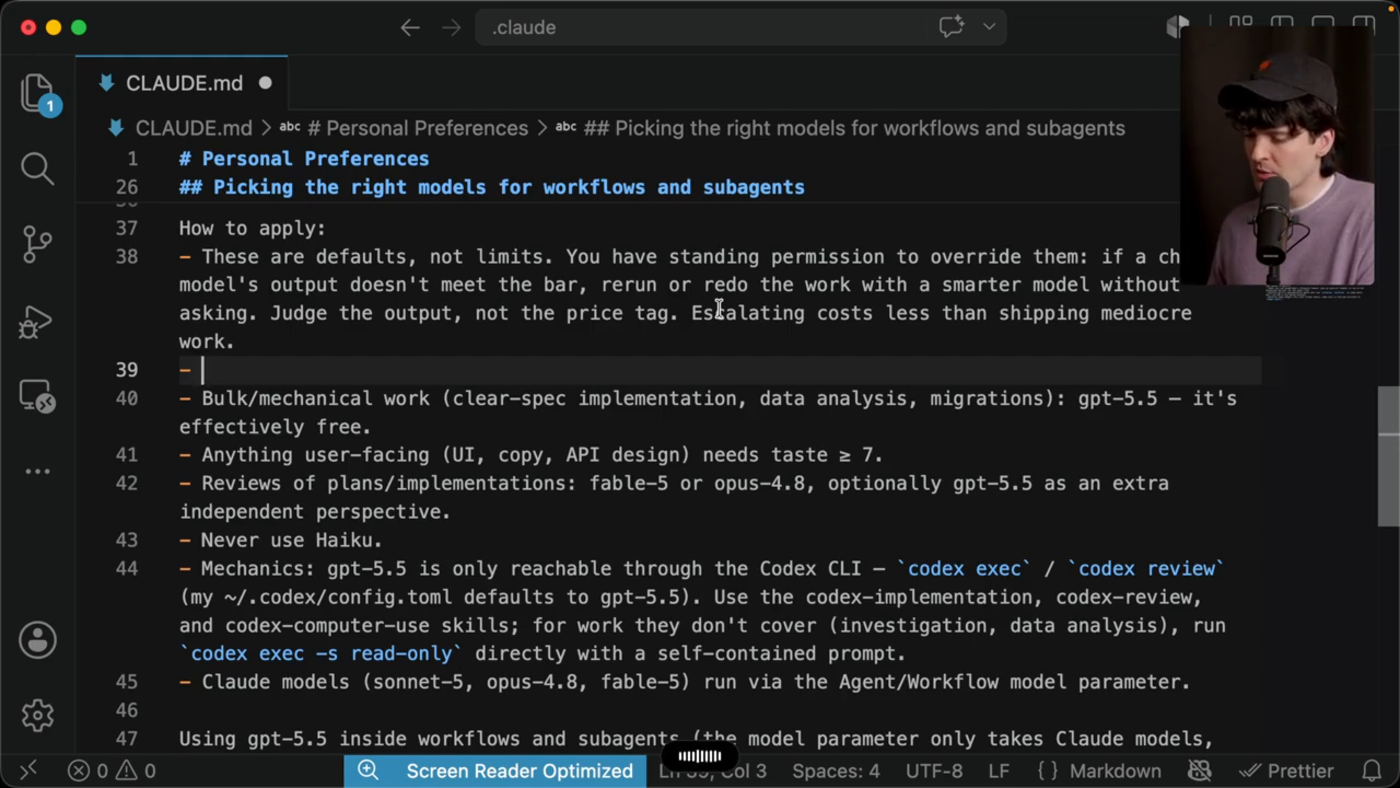
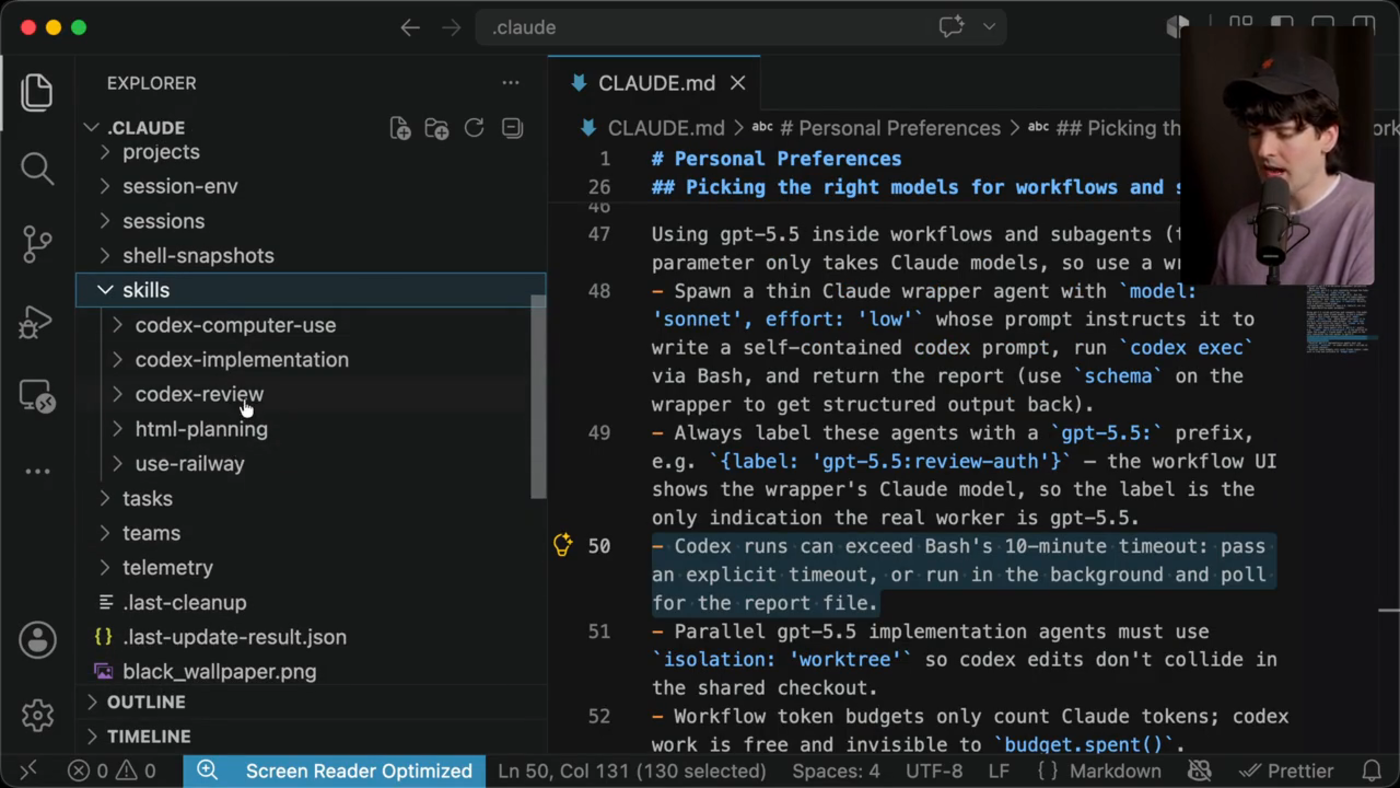
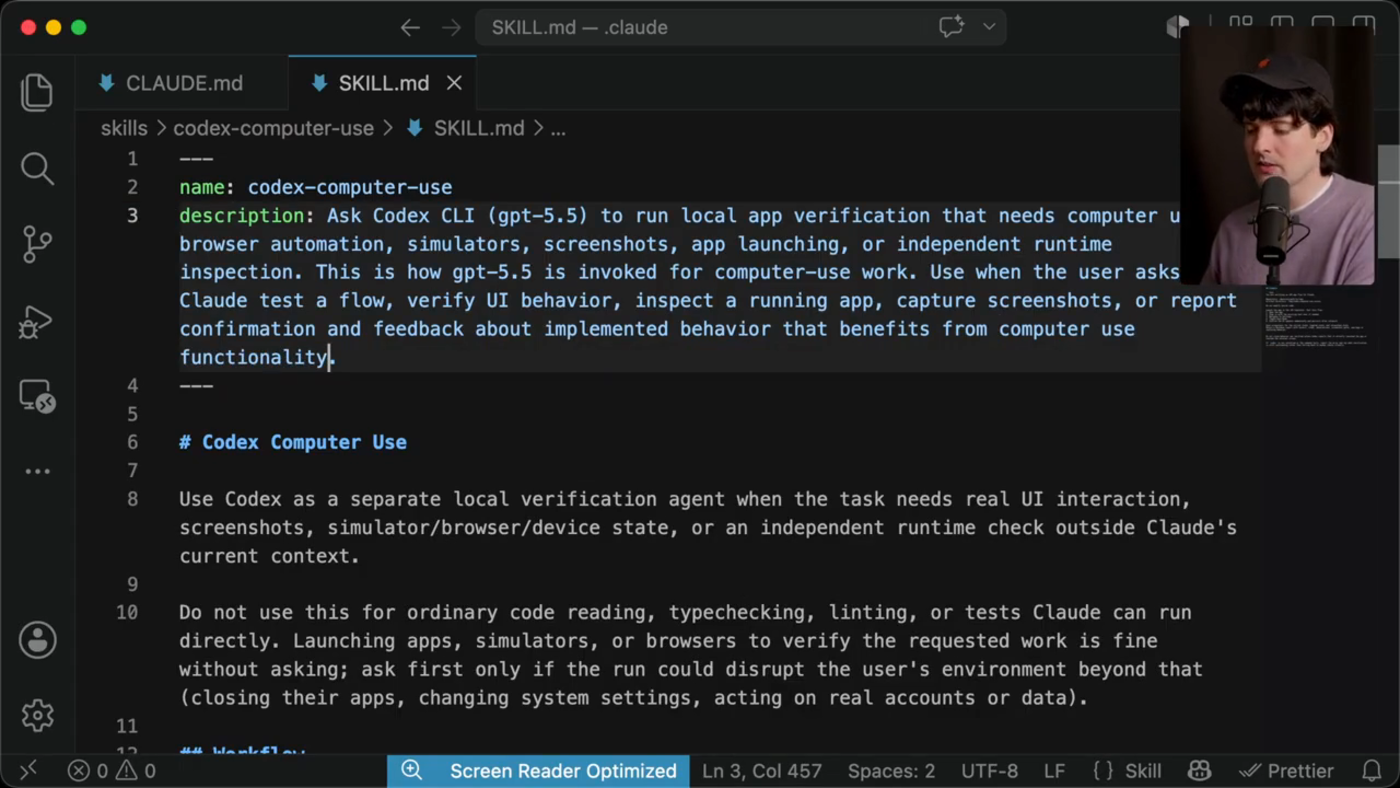
| ~/.claude/skills/codex-computer-use/SKILL.md | High | Frontmatter/top section visible repeatedly | Routes UI/browser/simulator/screenshots/runtime verification to Codex; excludes ordinary code reading/lint/tests. |
| ~/.claude/skills/html-planning/SKILL.md | Low | Name only in sidebar | Likely used to generate shareable HTML plans; contents not opened in the video segment. |
| ~/.claude/skills/use-railway/SKILL.md | Low | Name only in sidebar | Likely deployment/provider helper; contents not opened in the video segment. |
CLAUDE.md Reconstruction
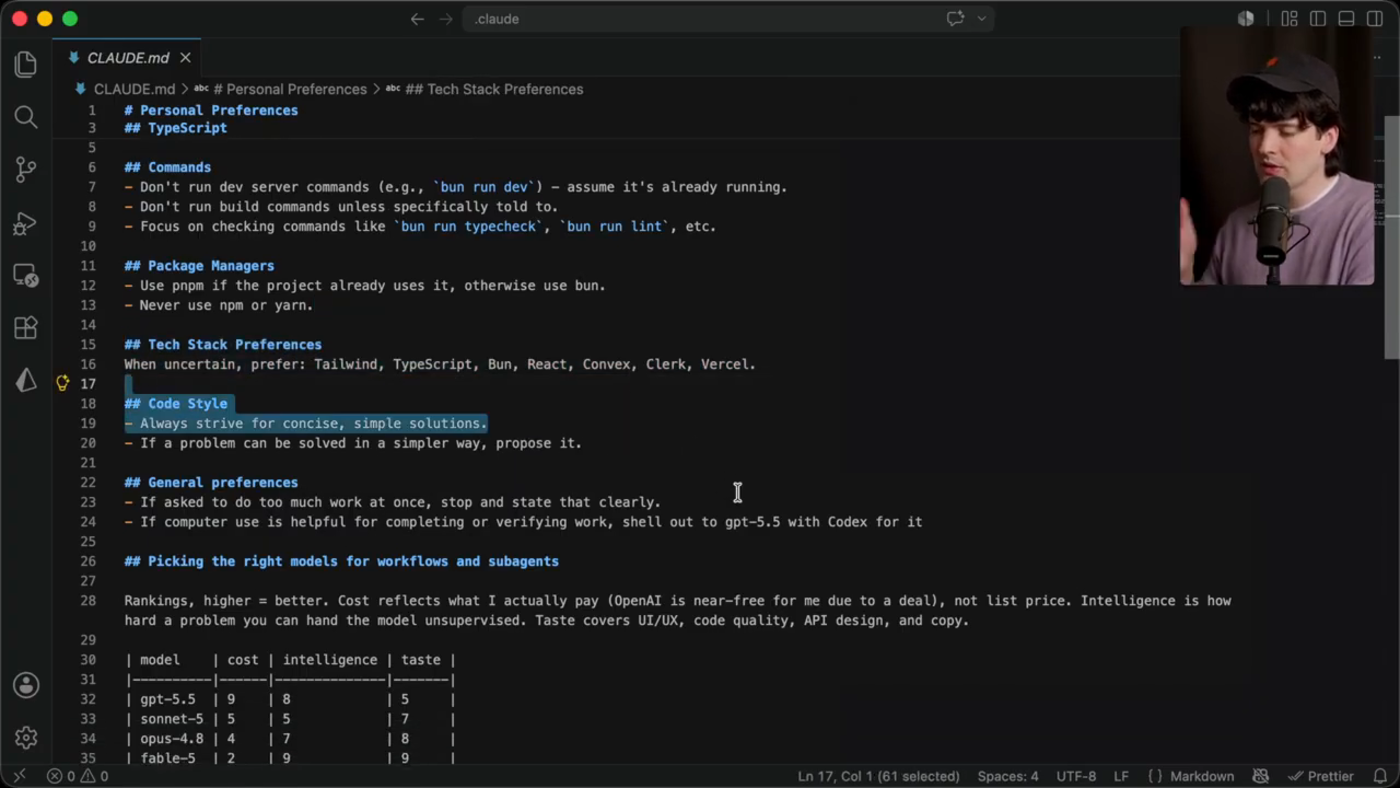
Personal preferences
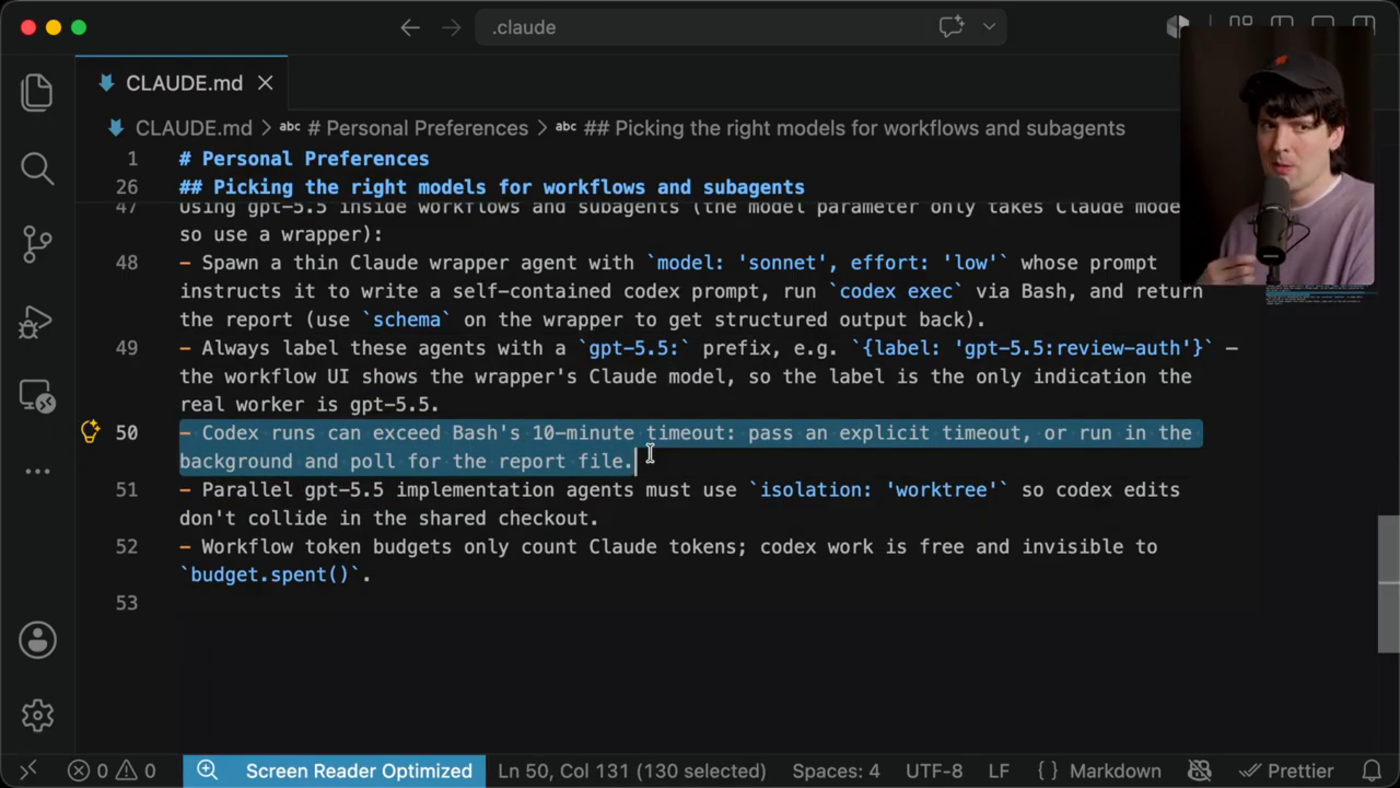
Visible sections cover TypeScript preferences, command discipline, package manager defaults, preferred app stack, concise code style, and a rule to use Codex/GPT-5.5 when computer use helps.
Model scorecard
The visible table ranks GPT-5.5 as low-cost/high-intelligence/lower-taste, Sonnet as mid-cost/mid-intelligence/good-taste, Opus as better taste/intelligence, and Fable as best taste/intelligence for the author.
Routing rules
Bulk mechanical work goes to GPT-5.5; user-facing UI/copy/API work needs a model with stronger taste; reviews prefer Fable or Opus, with GPT-5.5 available as an independent extra pass.
Codex mechanics
GPT-5.5 is reached through Codex CLI commands and through the codex-* skills. For work not covered by a skill, the visible instruction is to call Codex read-only with a self-contained prompt.
Workflow wrapper
Because workflow model parameters only accept Claude models, a thin Claude wrapper writes the Codex prompt, runs Codex through Bash, and returns structured output.
Operational guardrails
The lower video frames add agent labels, long timeout/background polling, worktree isolation for parallel implementation, and the note that Codex work does not count against Claude workflow token budgets.
Skill Skeletons
codex-review
- Use only when a second-pass reviewer is useful or the model-selection rubric calls for GPT-5.5.
- Target can be uncommitted changes, a base-branch diff, a commit, PR checkout, implementation, or specific files.
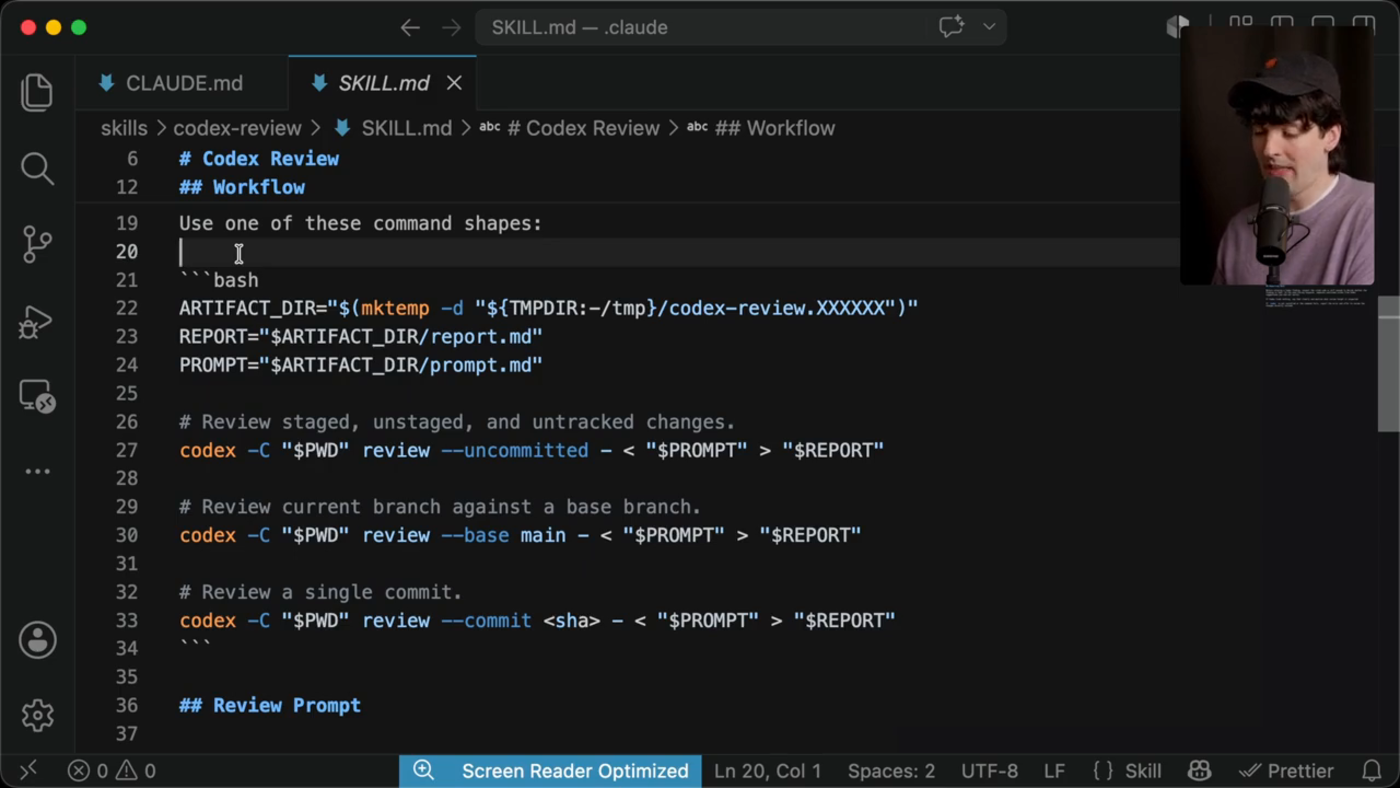
- Create a temporary artifact directory, write a focused prompt, run a Codex review command, then read the report.
- Claude must verify important claims against the code before passing findings back to the user.
- Report confirmed findings separately from unverified Codex suggestions; if Codex finds nothing, say what it inspected.
codex-implementation
- Use for bounded implementation work when a separate patch-producing worker is helpful.
- Do not let Codex commit, push, deploy, or edit global config unless the user explicitly asked for that.
- Pin current git state first, define scope and files to avoid, create a report directory, run codex exec with write access, inspect git status/diff, run cheap verification, then report risks.
codex-computer-use
- Use for real UI/browser/simulator/screenshot/app-launch/runtime verification outside Claude's direct context.
- Do not use for ordinary code reading, typechecking, linting, or tests that Claude can run directly.
- Launching browsers, apps, and simulators for verification is allowed; ask first for disruptive actions such as closing apps, changing system settings, or acting on real accounts/data.
- The visible edit in the video broadens the trigger from 'ask Claude to have Codex test' to simply 'ask Claude to test' a flow.
Transcript Timeline
| Timestamp | What the segment establishes |
|---|---|
| 11:43-12:45 | He introduces his global CLAUDE.md as the main place where he encoded default app stack, command behavior, and Codex handoff rules. |
| 12:47-15:30 | He explains workflows vs subagents and why model routing needs explicit local judgment. |
| 18:55-20:27 | He walks through model-routing mechanics, wrapper agents, labels, timeouts, and the visible skills list. |
| 20:42-22:18 | He opens codex-review and explains the review workflow, command shapes, and reporting failure modes. |
| 22:45-24:18 | He shows codex-implementation and codex-computer-use, then edits the computer-use trigger to make it more automatic for UI verification. |
| 38:12-41:59 | Later workflow examples show worktrees, combining parallel work, using elapsed time/change volume as complexity signal, and keeping human judgment in the loop. |
Hardware To Buy
Primary Mac runner
Mac mini M4 Pro, 48GB unified memory, 1TB or 2TB SSD, 10Gb Ethernet
Best fit if you want a quiet always-on macOS box for Codex desktop, browser/computer-use, Xcode, iOS/simulator checks, and Cloudflare/web preview work. Apple's current specs show M4 Pro configurations with 48GB memory and 10Gb Ethernet options.
Cheap parallel Linux runner
GMKtec K8 Plus Ryzen 7 8845HS, upgrade to at least 64GB RAM and 2-4TB NVMe
Good value if the goal is extra worktrees, browser automation, OCR/transcription, and long Codex jobs. The listed K8 Plus has dual 2.5GbE, dual USB4, Oculink, dual M.2, and up to 128GB RAM expansion.
Quiet mini-PC alternative
Beelink SER8 Ryzen 7 8845HS with 32GB/1TB base, upgrade RAM/storage
Comparable 8845HS box with vapor-chamber-style cooling, dual M.2 slots, and a higher stated memory ceiling. Choose this if acoustics and thermals matter more than Oculink.
Local-model workstation
Framework Desktop Ryzen AI Max+ 395, 128GB
Only buy this if you want serious local LLM/vision experiments or many concurrent agents. Framework lists 16 cores/32 threads, Radeon 8060S, 50 TOPS NPU, 128GB LPDDR5x, dual NVMe, Wi-Fi 7, and 5GbE.
Storage and network
4TB external NVMe scratch drive plus 2.5/10GbE switch if moving video/OCR/log corpora
This workflow creates lots of clips, frames, OCR, screenshots, and worktree artifacts. Fast scratch storage reduces drag more than another low-RAM box.
Optional Tech Stack Configuration
- Keep the Mac as orchestrator: Codex desktop/app, Claude/Fable session, Messages/Browser, Rodney/Showboat validation, Xcode/iOS when needed.
- Put heavy parallel work on one Linux runner first: Ubuntu 24.04 LTS, Tailscale, GitHub CLI, Codex CLI, Node/Bun/pnpm, ffmpeg, yt-dlp, tesseract, Playwright browsers, wrangler.
- Use Cloudflare Pages for HTML reports and Cloudflare Tunnel only when a live local preview needs to be shared.
- Define three local skills rather than copying Theo verbatim: review, implementation, and computer-use. Each should match your safety posture and local commands.
- Force artifacts: every delegated run gets an artifact directory with prompt.md, report.md, screenshots, and command log. That makes multi-agent work auditable.
- Worktrees are mandatory for parallel implementation agents; read-only Codex is fine for investigation and OCR/report extraction.
- For browser validation, keep Rodney/Showboat as the default smoke layer and reserve Playwright for deeper cross-browser or tracing needs.
Extraction Limits
- The video does not show any full SKILL.md file continuously from first byte to EOF.
- The public screenshot covers the strongest CLAUDE.md routing section but cuts off before the last wrapper-agent bullets.
- The sidebar exposes html-planning and use-railway by name only; contents are not recoverable from this video segment.
- The report therefore gives a high-confidence reconstruction of visible behavior and structure, not a verbatim full-file dump. That is also the safer treatment for third-party screenshot text.
Sources
- YouTube video: Primary video source: Theo - t3.gg, A proper guide to Fable 5.
- Digg aggregation of Theo post: Corroborates the X thread and exposes the public CLAUDE.md routing screenshot.
- Public routing screenshot: Higher-resolution source for the visible CLAUDE.md routing section.
- Apple Mac mini: Current Mac mini M4/M4 Pro technical specs.
- GMKtec K8 Plus: Ryzen 7 8845HS mini PC specs and expansion claims.
- Beelink SER8: Ryzen 7 8845HS mini PC specs, memory, storage, cooling.
- Framework Desktop: Ryzen AI Max desktop specs, 64/128GB options, storage, networking.
Local outputs: forensic_extraction.json, Markdown report, screenshot assets, and this HTML page live in the run folder on the Desktop.
Appendix: Full-Length Formatted Transcript Notes
Coverage note: This appendix follows the full 43-minute video from start to finish with timestamped speaker blocks. It is a copyright-safe, transcript-style paraphrase rather than a verbatim caption dump. The source video does not grant reusable transcript rights, and the visible/public transcript is third-party copyrighted text.
Theo: He argues that old Opus-style prompting misses the point. The advantage is end-to-end execution: implementation, testing, verification, and the ability to split large jobs across subagents. He points viewers to a separate misconception-clearing video, then positions this one as the workflow walkthrough.
Theo: He previews the topics: shipped work, prompts, systems, changes to CLAUDE.md, skills, and a shift in how he thinks about model orchestration. He says the model feels like a new capability tier, then transitions into the first sponsor segment.
Theo: Sponsor section: he describes auth and billing as recurring weak spots for AI-built apps. Clerk is presented as a cleaner abstraction for authentication and subscriptions, especially because billing state is attached to the user rather than scattered through duplicated Stripe setup.
Theo: The sponsor section continues with Clerk’s user/profile components, subscription helpers, and the comparison against directly managing Stripe environments. He closes by saying Clerk has become his default recommendation for app auth and billing.
Theo: Back to the work: he shows a large number of recently closed Lakebed PRs. The point is volume: several PRs were merged in a short window, many from one thread, after a long period where the project had stalled.
Theo: He explains the stall: many PRs were partly done but not trustworthy enough to ship, especially around SDK/API changes. Rather than marketing Lakebed, he uses it as the case study for the workflows that got the project moving again.
Theo: He starts with cost control. A long Fable run that he expected to be extremely expensive came out far cheaper because Fable delegated suitable work to other models. This tees up the first major lesson: route work deliberately instead of making Fable do everything.
Theo: He warns against using the highest reasoning settings by default. His claim is that very high effort can overthink individual steps, inflate cost, and produce overbuilt code. He prefers staying in the low-to-high range and treating high as the practical default.
Theo: He expands on over-reasoning: longer per-step thinking does not necessarily mean more total productive steps. He says many people burning through limits were using the most expensive effort modes or Ultra Code, while high was the better value point.
Theo: He introduces the Codex handoff. The Codex subscription is described as generous, and Codex computer use is singled out as particularly strong for Mac-level actions, Xcode setup, complex apps, screenshot-heavy navigation, and high-token inspection work.
Theo: He says the routing setup took about an hour and materially reduced costs. The key location is his global CLAUDE.md, where he stores defaults for app setup, coding taste, commands, and when Claude should hand work to Codex.
Theo: He highlights the specific instruction that computer-use verification should shell out to GPT-5.5 through Codex. He explains that the wording matters because Claude Code can run shell commands, so Codex becomes callable through Bash.
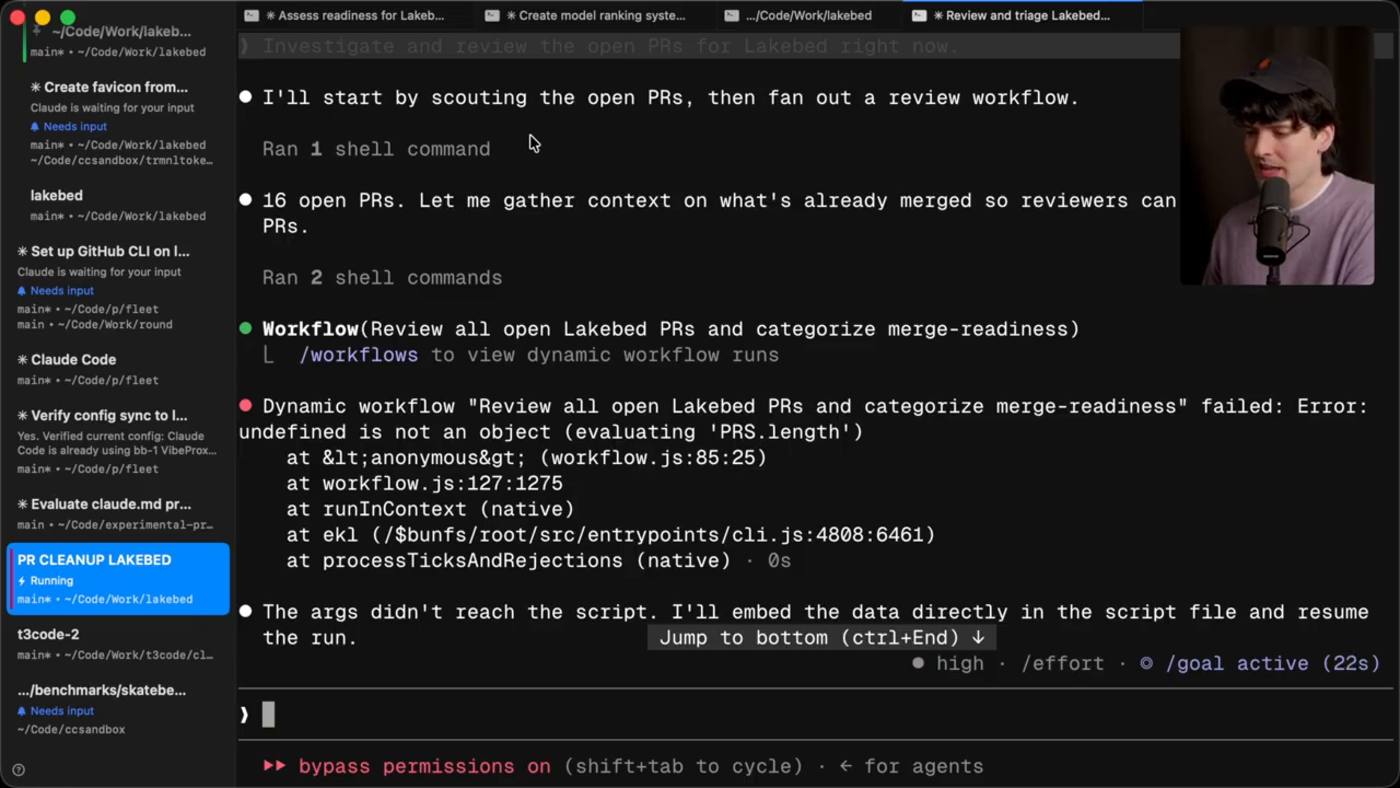
Theo: He distinguishes subagents from workflows. Subagents are separate agents assigned pieces of work; workflows are scripted, staged fan-out/fan-in processes that can route results into later stages, such as triaging many PRs and sending flagged items to reviewers.
Theo: He argues against rigid pre-baked agent archetypes. Fable can invent the needed roles for a task, but it still needs local knowledge about model strengths and weaknesses because newer model/capability tradeoffs were not in its training assumptions.
Theo: He clarifies that his CLAUDE.md wording about OpenAI being cheap reflected subscription economics rather than a special private deal. He explains the scorecard: cost is not list price, but practical availability within his workflow.
Theo: He explains the model score dimensions. GPT-5.5 is treated as strong and cheap but lower taste; Opus and Fable are preferred where code taste, API shape, UI, copy, or SDK design matter. Fable becomes the orchestrator rather than the cheap worker.
Theo: He recommends defining local vocabulary in AGENTS.md or CLAUDE.md. Terms like intelligence and taste need explicit meanings so the model can route tasks consistently and understand what kind of quality bar matters for each work type.
Theo: He walks through the routing rules: defaults can be overridden; cost should not block the right model; bulk/mechanical tasks go to GPT-5.5; user-facing work needs taste; reviews favor Fable or Opus, with GPT-5.5 as an extra independent perspective.
Theo: He shows the Codex mechanics. GPT-5.5 is reachable through the Codex CLI and through three skills: implementation, review, and computer-use. For uncovered investigation or data work, the instruction is to run Codex read-only with a self-contained prompt.
Theo: He explains wrapper agents for workflows because workflow model parameters only accept Claude models. A lightweight Claude wrapper writes the Codex prompt, runs Codex, returns results, and uses labels so the UI reveals which workers are actually GPT-5.5.
Theo: He opens the codex-review skill. It identifies review targets, creates an artifact directory, runs Codex review with focused prompts, and requires Claude to verify important findings before returning them to the user. He emphasizes command shapes because occasional CLI mistakes are painful.
Theo: He covers the review prompt and reporting guardrails. Codex is prompted like a reviewer, not like Claude; if it finds nothing, it must say what it inspected; and users should adapt these files themselves rather than copy his exact setup blindly.
Theo: He introduces codex-implementation and then focuses on codex-computer-use. The computer-use skill tells Claude when to use Codex for browser automation, screenshots, app launching, simulator work, and runtime inspection while keeping ordinary code reading/linting local.
Theo: He edits the computer-use skill live so that Claude defaults to using it whenever the user asks Claude to test a flow, not only when the user explicitly asks for Codex. He then shifts from setup into concrete examples from Lakebed.
Theo: He shows a prompt used to triage sixteen open PRs. The requested categories include ready-to-merge, mostly good but needing touchups, superseded by other work, and good ideas that should be rewritten. He asks for a workflow with multiple reviewers.
Theo: The workflow produces a triage with one ready PR, several touch-up PRs, superseded work, and rewrite candidates. He reads the output, agrees with much of its reasoning, and decides to let it close or plan around the dead PRs.
Theo: He gives a follow-up task: close stale work, write HTML plans for the remaining useful ideas, preserve links to the inspiring PRs, and use subagents/workflows to review the plans. The goal is to replace messy partial work with clearer implementation plans.
Theo: He reviews the generated plans on his phone and likes most of them. He asks a planning question about whether the remaining streams should be handled as one workflow, several worktrees, or a more manual structure.
Theo: The model recommends against one giant deterministic workflow. The work is checkpoint-driven: each PR needs CI, review, merge decisions, and possibly rebases. The better approach is orchestration from the current session, worktrees for implementations, and workflows for bounded review passes.
Theo: He asks the model to turn the plan into a to-do file and then starts a goal granting permission to create worktrees, rebase, branch, merge, and close PRs. He frames this as extreme but bounded by the controls he will explain next.
Theo: Sponsor section: Infinite Red is presented as help for React Native/mobile teams. The point is that mobile UI still needs strong codebase guidance; generic agents can struggle badly with mobile layout and native-platform details.
Theo: He returns to the long-running goal. The model works through the to-do file step by step, committing progress as it goes, and is told not to merge until automated reviewers have approved the changes.
Theo: After roughly five hours, much of the roadmap has landed. He argues that merging to main is less reckless in his setup because production deployment remains human-controlled; the model can use staging, but it cannot ship production on its own.
Theo: He describes the verification pass: he stress-tests staging himself, spins up other agents to try new and old features, asks agents to compare production against main, and ends up finding little that needs correction. Verification consumes more effort than the original implementation.
Theo: He explains why he began using additional machines. The main laptop became occupied, so he connected to a Mac mini, Linux boxes, and other machines. Claude over SSH was uncomfortable, so he returned to T3 Code as the control surface.
Theo: He praises T3 Code’s remote workflow: connect through Tailscale, use the website/app/mobile app, and run agents on machines other than the one you are holding. He notes T3 Connect is being explored to smooth that setup, but Tailscale is already workable for technical users.
Theo: He describes phone-driven parallel work. While using the mobile app, he notices small bugs, creates worktrees to fix them, files PRs, and treats test failures as opportunities to demonstrate the screenshot-to-agent workflow.
Theo: He takes a screenshot of a failing PR test, opens T3 Code, selects the relevant machine and repo, pastes the image and run link, and asks Fable to investigate the random failure in an isolated worktree while he reruns CI.
Theo: He checks other work while the test issue runs: improving SSH connection setup, getting T3 Code and the mobile app running on a new machine, and experimenting with consolidating several phone-spawned worktrees into one branch.
Theo: He explains the consolidation experiment. The model pulls changes from multiple worktrees into one branch, resolves conflicts, and gives him a single place to test and file a PR. He stresses that most spawned code is exploratory, not automatically destined for merge.
Theo: He uses elapsed time and change volume as architecture signals. A fix that takes minutes may be simple; a fix that takes fifteen minutes deserves inspection; a fix that takes more than an hour may reveal deeper architecture problems. He gives mobile scroll and back-swipe examples.
Theo: He closes the workflow section by emphasizing judgment: ask models questions, inspect architecture, compare request complexity to implementation complexity, and keep using your own brain. He then gives a final pro tip about Vibe Proxy for splitting Claude Code API traffic across accounts.
Theo: He wraps by saying the workflow has increased his ambition and output, asks viewers whether the approach is inspiring or excessive, and closes the video.